Practical AI for Ohio Businesses

 10 ways to start using AI right now 


AI is everywhere right now, but most business owners are still asking the same question: What am I actually supposed to do with it?

At our recent Westerville chamber of commerce presentation, we focused on something different from the usual AI conversation. Instead of theory, hype, or highly technical demos, we shared practical ways businesses can start using AI right away. That approach came straight from the workshop itself: fewer abstract discussions, more real things you can try today.

Whether you are trying to save time, solve problems faster, improve research, or find repetitive work that could be streamlined, AI can be useful right now when applied in the right places.


What We Covered

In the presentation, we walked through practical examples like:

  • Using AI as a smarter search engine
  • Creating images from a rough concept through conversation
  • Asking AI questions about a PDF or website
  • Showing AI a photo and asking for help
  • Using AI to learn something new more quickly
  • Stress-testing ideas and decisions
  • Comparing products and options
  • Troubleshooting with better prompts and better context
  • Using AI in email and invoice workflows to save time 
  • Identifying repetitive processes that may be good automation candidates
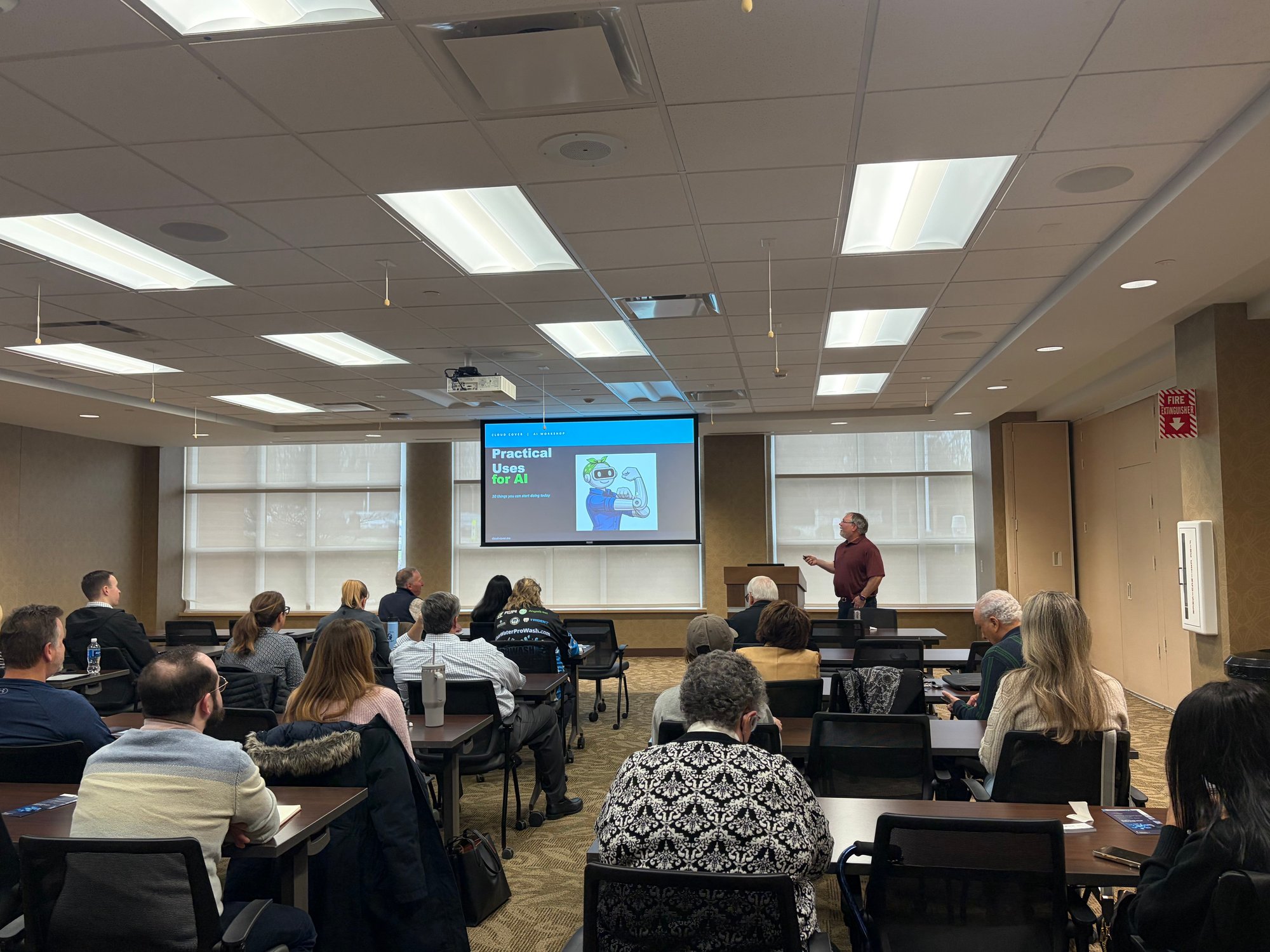
AI presentation 3
Top view of successful businessman standing near the entrance of labyrinth

AI Does Not Have to Be Complicated

What we really wanted members to get from the session was that AI becomes more useful when it is applied to everyday work. In the presentation, we showed examples from research and contracts to troubleshooting, invoices, and internal workflows. The point was not that every business needs a full AI strategy overnight. The point was that most businesses already have a few practical use cases worth exploring. 

Where Businesses Often Start 

Many organizations get the fastest value from AI in areas like:

Research and answers

AI can often act as a faster starting point for questions, summaries, and explanations, while still requiring users to verify important claims and source quality.  AI can often serve as a much faster starting point when you need answers, summaries, or clear explanations. Instead of spending time searching multiple sources or reading through long documents, you can use AI to quickly get an initial draft, a concise overview, or a straightforward explanation that helps you move forward sooner. We emphasized that AI is a powerful assistant, not an automatic authority, and that your team should treat its output as a starting point to refine, verify, and improve rather than something to accept at face value. 

Documents and websites

Instead of manually reading long PDFs, contracts, or webpages, AI can help summarize content, answer specific questions, and pull out key obligations, dates, or findings when given the right context. For example, if you have water in your basement and you want to know if your home owner's insurance policy covers sump pump failures, you can ask AI to find the clause instead of reading through 20 pages of fine print and jargon that might seem like a foreign language to you if you're not an insurance agent.

Troubleshooting and learning

We demonstrated that AI is much more useful when the prompt includes meaningful detail. The examples around photos, equipment issues, and learning unfamiliar topics all reinforced that better context leads to better answers. If you give a vague prompt, you get a vague answer. But if you are trying to fix something around the house, for example, a furnace or a leaking radiator, you can give AI the brand name, model number and any other information that you can find on the label and include pictures of the parts. Tell AI what is happening and what you want to do. It can do a pretty good job of point you in the right direction with parts lists, YouTube videos, manuals and guides to help you start your repair project.

Repetitive work

What we really wanted to showcase are examples of how to use AI at work to save time. We showed examples that involved our internal process improvements that we have designed and implemented to save hundreds of hours a year. We have built workflows including one that has automated our invoice reconciliation process and has reduced that manual process from 10–20 hours per month to about 1 hour. These are actual use cases that we use every day and are building for our clients. If you or your employees are doing repetitive work that takes hours per month, that might be a case for AI automation or custom workflows. Not only does this free up you and your team's time, it allows you to focus on higher value work. 

How to Find Your Best AI Use Cases

A simple place to begin is by asking:

  • Do we spend a lot of time on something repetitive?
  • Do we spend a lot of money on a manual process?
  • Are we paying someone to do something boring?
  • Do we need something done faster?
  • Do we wish we could capture notes more easily?
  • Do we regularly onboard new employees?

Those were some of the questions we shared in the workshop because they help move AI from a vague idea to a practical business conversation. If you have answers for these questions, then chances are, you have a use case for AI assistance. Want to see more? Download our slide deck from the presentation here. 

Practical AI Help from Cloud Cover

If your business is interested in AI but unsure where to begin, Cloud Cover can help you identify practical use cases that fit your team, your workflows, and your goals.

We can help you think through:

    • Where AI may save time first
    • Where AI can support research and decision-making
    • Where caution and governance matter
    • Which use cases are realistic now
    • Which repetitive tasks may be worth automating

Curious where AI fits in your business?

Schedule a Practical AI Use-Case Session with Cloud Cover.

We’ll help you identify a few realistic ways AI could support your business without overcomplicating it.

Want to know more about ways we could help you reduce hours on manual processes, schedule a call with us.

Proud to Be Local. Areas We Serve in Ohio:

Columbus Metro Area Including:

Pickerington

Pickerington

Worthington

Worthington

Dublin

Dublin

Westerville

Westerville

Gahanna

Gahanna

downtown

Downtown

Grove-city

Grove City

Hilliard

Hilliard

Outside of Columbus

Also providing remote Cybersecurity services throughout the Midwest.

Lancaster

Lancaster

Newark

Newark

Zanesville

Zanesville

Athens

Athens

Mansfield

Mansfield

Marion

Marion

Delaware

Delaware

Celina-1

Celina

Coldwater

Coldwater

St. Marys

St. Mary's