
AI is getting a lot of attention, but many business owners are still left with a basic question: what are the practical ...
AI is getting a lot of attention, but many business owners are still left with a basic question: what are the practical uses for AI that actually matter in day-to-day business?
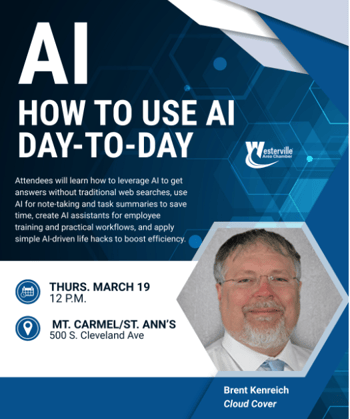
That was the focus of our recent chamber presentation. Instead of talking about AI in abstract terms, we walked through real examples businesses can start trying right now. The workshop was built around a simple idea: too many AI conversations stay theoretical, when most business owners just want practical use cases they can apply today.
Download the presentation to follow along with practical examples.
Here are 10 practical ways to start using AI in your business.
1. Use AI as a smarter search engine
AI can often give direct answers, synthesize information across multiple sources, and explain its reasoning more clearly than a traditional search engine. It can be a great research starting point. At the same time, users should still ask for sources and verify important claims, especially around legal or medical information. Used this way, AI can save your team significant time, reduce frustration, and help non-technical staff feel more confident tackling technology, finance, or operations questions on their own. It can also help you frame better questions for subject matter experts, because you come into the conversation with a baseline understanding rather than starting from zero.
2. Create images from a rough idea
AI image tools can turn a simple concept into a refined visual through conversation and iteration. In our presentation, we showed how one rough idea evolved through multiple rounds into a finished branded image. It is important to note that some AI tools are better than others for image generation. And it is important to refine and double check AI's work. For example, I asked AI to generate an image of a man at a computer that was frustrated. This is the first image I got:

After some refinement and a few versions, I was able to get a better image than this guy, who yes, is clearly frustrated but at the same time.... not exactly the image I was looking for.
3. Ask AI about a PDF or website
One of the most practical uses for AI is uploading a document or pointing it to a webpage and asking questions about it. That can be useful for research, contracts, vendor materials, or any long document where you want a faster summary and a more focused review. I just used this the other day when reviewing our insurance renewal. I wanted to make sure we had a specific clause included and I was able to ask the Adobe AI agent to find key words for me. I was able to quickly figure out that the clause was not included in the document so I sent it back to our agent to revise the renewal.
4. Show AI a photo and ask for help
AI can also work from images. In the workshop, we showed how a vague prompt tied to a photo produced a weak answer, while a more specific prompt with context led to much more useful guidance. If you download the presentation, you will see a real world example of how I showed AI a picture of my leaking radiator to figure out a parts list, YouTube videos and guides on how to repair this myself.
5. Use AI to learn something new
AI can be a patient tutor when you need to understand an unfamiliar topic. We highlighted how AI helped explain terminology and concepts step by step, making it easier to solve a real-world problem afterward. Just like a guide with images and steps to follow, AI can help you learn something new. Have you always wanted to learn how to make restaurant quality pizza at home? Ask AI for instructions, variations using ingredients you have on hand, the type of oven or grill you want to use and you can even ask it to link the recipe to a shopping list at your local grocery store.
6. Stress-test your thinking
AI can help you think more critically by arguing the other side of your position, pointing out weak assumptions, and helping you prepare for tough conversations or decisions. You can use this in so many ways. Want to talk to your boss about a promotion and a raise? Ask AI for guidance and talking points. Tell AI why you think you deserve the promotion and possible reasons why your company might say no. Give it examples of past conversations and policies that might go against you. Then you can better prepare to support the conversation to go in the direction that is in your favor.
7. Compare products and options
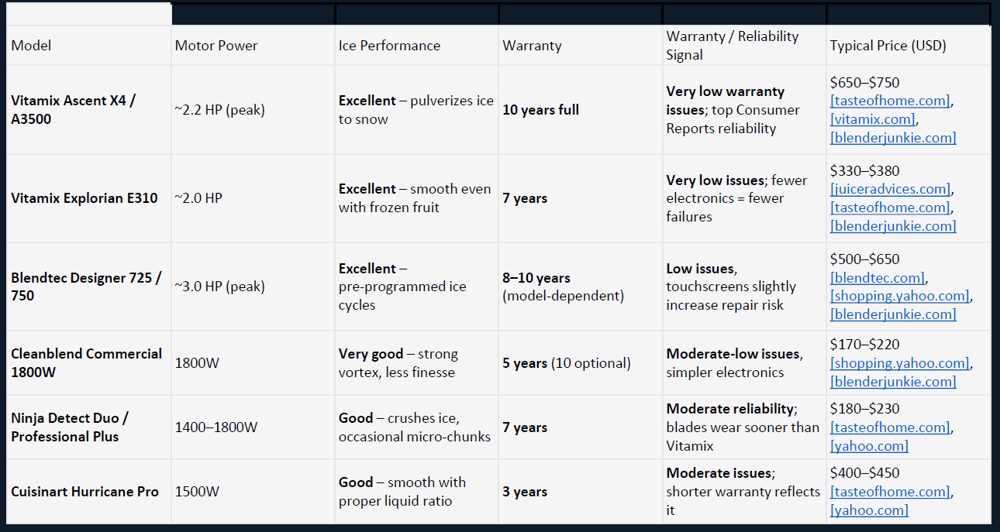
Instead of broad product searches, AI can help build more useful comparisons when you give it context about your use case, budget, and priorities. The presentation demonstrated how much stronger the result becomes when the prompt is specific. When looking for a blender that was powerful enough to blend my smoothie to a perfect consistency, I gave AI the features I wanted and my budget. It gave me a side by side comparison of a few different models and included the links to learn more, purchase and even a YouTube channel that led me to make my choice after watching a guy blend everyday items in the Blendtec. I am happy to report that I love my Blendtec and AI helped me make that choice.
8. Troubleshoot more effectively
The session also showed that AI becomes dramatically more useful in troubleshooting when you provide meaningful technical or situational detail. More context leads to more relevant suggestions. I was able to fix my furnace at home by giving AI as much information as I had. I had very little knowledge but with reasoning and good prompts, I was able to troubleshoot like a pro.
9. Support invoice and email workflows
One business-focused example in our presentation were actual workflows that we built using an AI agent. We created an AI-powered invoice workflow that searched email for recent invoices, parsed PDF line items into categories, built summary tables, and linked directly to source documents. This manual process for reconciling vendor invoices used to take up to 20 hours of manual labor every month. Now it takes me an hour per month to get the same results.
10. Find automation opportunities
A simple place to begin is by asking:
- Do we spend a lot of time on something repetitive?
- Do we spend a lot of money on a manual process?
- Are we paying someone to do something boring?
- Do we need something done faster?
- Do we wish we could capture notes more easily?
- Do we regularly onboard new employees?
All of these questions can lead you to find manual or tedious processes that can be automated so that you and your team can focus your energy on higher value work.
Frequently Asked Questions
What are the most practical uses of AI in business?
AI is widely used in business for automating repetitive tasks, improving customer support with chatbots, analyzing data for better decision-making, enhancing cybersecurity, and optimizing marketing strategies. These applications help businesses increase efficiency and reduce operational costs.
How can AI help small businesses grow?
AI helps small businesses grow by automating daily operations, improving customer engagement, and providing data-driven insights. Tools like AI chatbots, CRM automation, and predictive analytics enable small businesses to compete with larger companies more effectively.
Which business processes can be automated using AI?
AI can automate processes such as customer service responses, email marketing, data entry, inventory management, fraud detection, and reporting. These automations save time, reduce human error, and allow teams to focus on strategic tasks.
Is AI cost-effective for business operations?
Yes, AI is cost-effective in the long run as it reduces labor costs, improves efficiency, and minimizes errors. Businesses can achieve higher productivity with fewer resources, making AI a valuable investment for both small and large organizations.
What we hope our attendees and you take away from this is that the best way to start with AI is not by trying to do everything. It is by identifying one or two practical use cases where your team is spending too much time, too much effort, or too much money on manual work.
If you want to read about more ways to use AI in your everyday life, check out Holli's blog post: "Fun and practical ways to use AI in real life."
Want help finding the right AI use cases for your business?